Everyone who joins LeadsLeap starts on the free plan, and Pro costs $27 a month. So a LeadsLeap free vs pro comparison comes down to one question: what do you get for that $27 that you can’t already do for nothing?
LeadsLeap is an online marketing platform with a long list of tools, and three of them do most of the work for most members. The Page Builder creates web pages, like landing pages, thank-you pages, and opt-in pages (like pages where visitors leave their email address to get something free). The Email Marketing system, which most people know as an autoresponder or list manager, collects email addresses and sends emails to them. The Advertising system promotes your pages to other LeadsLeap members and, with Pro Ads, to visitors who aren’t members through a widget on other websites. The list goes on, with things like a link tracker that counts the clicks on your links, but those three are where most of the action is.
I’m a Pro member myself, and I went through LeadsLeap’s own tutorial for the details, because reviews online disagree with each other on what each plan includes. Here’s what you get for free, what Pro adds, and who should pay.
What You Get With a Free LeadsLeap Account
Everyone starts on the free plan, and it isn’t a trial. LeadsLeap calls it a lifetime free membership, and a good part of the platform works without paying anything.
Here’s what’s included. The Page Builder gives you up to 10 pages with hosting included, so you don’t need your own website or a hosting plan to publish them. You also get up to 10 popups, which are opt-in forms you can add to your own blog or website, hosted for you as well. For email, you get up to 10 mailing lists with unlimited subscribers, which means you can keep a separate list for each site or offer you promote. And for traffic, you can post Credit Ads, which I explain further down.
There’s also the Link Tracker. Every page you build already has its own tracking, so you don’t need the tracker for those. It’s for any other link you want to count clicks on, like a referral link or an external page, and free members get 199 trackers and 10 rotators (a rotator sends visitors to a different link each time, so you can split your traffic between offers).
Bonus tip: you can also send broadcasts to your lists. A broadcast is a one-time email to everyone on a list, like a newsletter or an announcement, and free members can send 10 of them in any 30 days.
LeadsLeap also lists five ways to make money inside the platform, from referral commissions to a daily bonus for viewing ads. The one that matters most here is the referral commission: when someone you refer upgrades to Pro, you earn a recurring commission of 25% on the free plan, or 50% if you’re a Pro member.
The Page Builder: Create Your Pages Without Paying for Hosting
Everything starts with a page. The Page Builder lets you create web pages inside LeadsLeap, and LeadsLeap hosts them for you, so you don’t need a separate website or a hosting plan. You can build any kind of page with it: landing pages, thank-you pages, splash pages, guides, or a page that isn’t promoting anything at all. Most people use it to promote something, though.
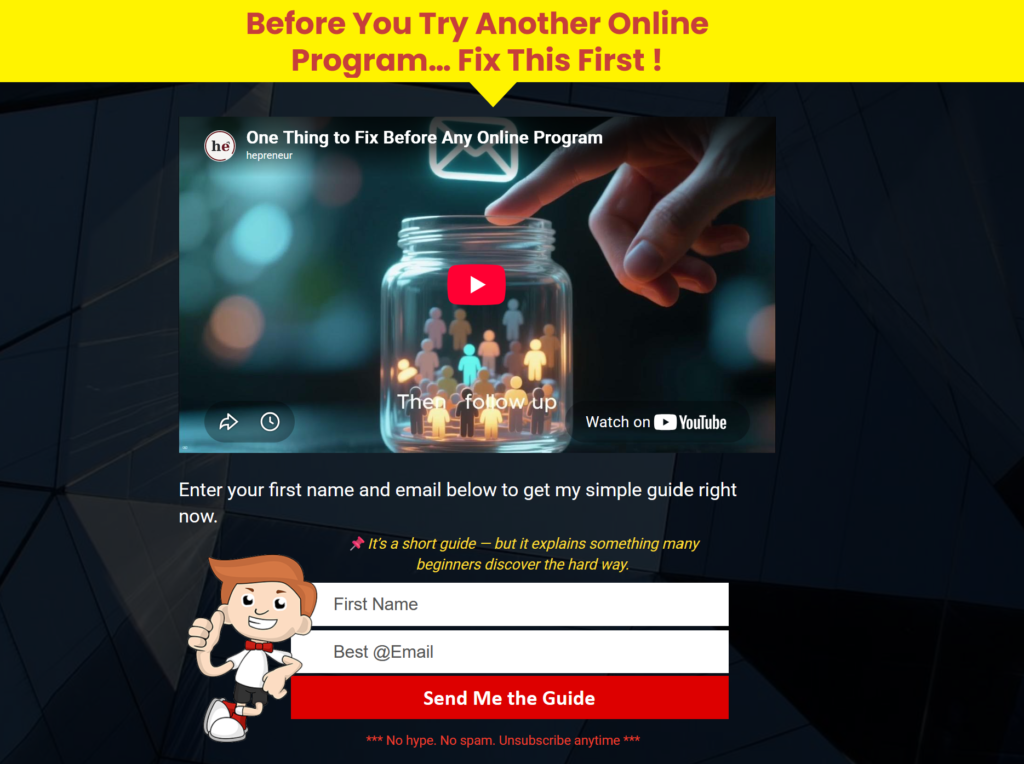
The most common example is an opt-in page. A visitor types their email address into a form and gets something free in return, like a short guide or a discount code. You connect the page to one of your mailing lists, and every address a visitor enters is added to that list automatically. Every page also comes with its own tracking built in, so you can see how many people visited it without setting anything else up.
As a free member you can build up to 10 pages. As a Pro member, there’s no limit. Once a page is collecting email addresses, those addresses need somewhere to go, and that’s where the Email Marketing system comes in.
Email Marketing: What Free Allows and What Pro Adds
Email marketing just means collecting email addresses from people who are interested in what you offer, then staying in touch with them. In LeadsLeap that’s the Email Marketing system, the autoresponder or list manager I mentioned earlier. If you’ve used one before, the idea will be familiar. If you haven’t, it’s simply a tool that stores your subscribers and sends emails to them for you.
As a free member you get up to 10 mailing lists with unlimited subscribers, which is generous. Having several lists lets you keep your audiences separate, for example one list for each site or offer you promote. You can also set up a welcome email that goes out as soon as someone confirms their subscription, and you can send broadcasts, 10 in any 30 days. A weekly newsletter uses four or five of those, so that’s plenty to start.
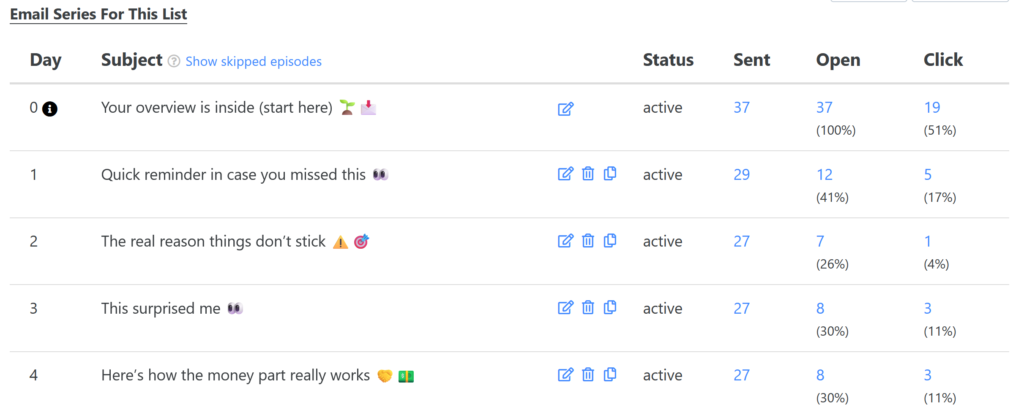
Pro takes the Email Marketing system a lot further. You get unlimited lists, no limit on broadcasts, and Email Series. An Email Series is a set of follow-up emails that LeadsLeap sends automatically after someone subscribes. For example, you could send a Welcome email on day one, a second email on day three, a third on day seven, and keep going from there. You write them once, and LeadsLeap sends them to every new subscriber on that schedule.
If your goal is to start building a mailing list using opt-in pages, this is one of the best features you’ll find as a Pro member. A mailing list is also what many people start with before they have much traffic to a website, and the post on email list vs website traffic looks at whether that’s the right order. Either way, a page and a list still need visitors.
Credit Ads vs. Pro Ads: How Advertising Works on LeadsLeap
Inside LeadsLeap you can promote your pages using short ads. An ad is a small promotion made of a picture, a title of up to 25 characters, and a line of text up to 60 characters, and clicking it takes people to your page.
The free kind, called Credit Ads, works a lot like a traffic exchange. If you’ve never used one, a traffic exchange is a site where members view each other’s pages: you view other members’ ads to earn credits, and you spend those credits to get your own ads viewed. One credit buys one visit to your ad. You can’t buy credits, and the ones you don’t use expire after 6 months.
As a free member you can post up to 3 Credit Ads, and Pro members get 10. It takes a lot of time and effort to earn enough credits to keep even those running, because you have to view ads every day, and each Credit Ad expires after 14 days, so you refresh them every couple of weeks. Still, it’s a great way to get free traffic to your pages as long as you keep at it daily.
Pro Ads are the paid kind, and you only get them as a Pro member. They don’t need credits and they run around the clock. LeadsLeap also gives them higher priority than Credit Ads and shows them in more places: in the daily emails it sends to members, in a widget on more than 4,000 other websites, and inside the Link Tracker, which other traffic networks use too. A Pro member can post 10 Pro Ads on top of 10 Credit Ads.
Who sees them? LeadsLeap describes its audience as online marketers and opportunity seekers, which means people who joined to find ways to make money online. So a Pro Ad works best when your offer fits that. An ad for a tutorial on building your first affiliate website is a good match, because the people viewing it are already looking for ways to earn online. An ad for a pressure cooker review is a bad one. Nobody browsing LeadsLeap ads is there to shop for kitchen gear, so most would skip it.
One more thing about the traffic. LeadsLeap rotates Pro Ads by account, not by ad, so every Pro member gets roughly the same total traffic whether they post one Pro Ad or ten. Interesting ads get a bigger share of it and boring ones get less. So the $27 doesn’t buy you a bigger audience than the next Pro member. It buys you a steady one, and the ad you write decides how much of it you get.
How Pages, Email, and Ads Work Together
Here’s the whole loop. You build a page with the Page Builder. You connect it to a mailing list, so every visitor who signs up becomes a subscriber you can follow up with. Then you promote that page with Credit Ads or Pro Ads to bring in more visitors. As a free member you can run that entire loop without paying for hosting, an autoresponder, or advertising, because all three live in the same account.
As a Pro member, the same loop gets bigger and saves you time: unlimited pages and lists, Email Series that follow up on their own, and Pro Ads that run without the daily chore of earning credits.
If you’d rather see the differences side by side, here they are.
| What changes | Free | Pro |
|---|---|---|
| Pages (Page Builder) | Up to 10, hosting included | No limit |
| Popups | Up to 10 | No limit |
| Mailing lists | 10 lists, unlimited subscribers | Unlimited lists and subscribers |
| Email Series | Not included | Included |
| Broadcasts | 10 every 30 days | No limit |
| Credit Ads | 3 | 10 |
| Pro Ads | Not included | 10, running without credits |
| Referral commission | 25% | 50% |
| Price | $0 | $27 a month |
How $27 a Month Compares With Other Platforms
To round out this LeadsLeap free vs pro comparison, I checked how $27 a month stacks up against other platforms that sell similar Page Builder and Email Marketing tools. None of them runs an advertising network like LeadsLeap’s, so they’re not a direct match. These are the prices I found in October 2026.
Mailchimp‘s free plan allows 250 contacts and 500 emails a month, with no automations. Its Essentials plan starts at $13 a month for 500 contacts. Multi-step automations, the equivalent of an Email Series, are on the Standard plan, which starts at $20 a month for 500 contacts. The price goes up as your list grows.
Systeme.io‘s free plan allows 2,000 contacts, unlimited emails, and 3 sales funnels (a funnel is a chain of pages, like an opt-in page followed by a thank-you page). Its first paid plan, Startup, is $17 a month for 5,000 contacts.
On the free plans, it’s a trade. LeadsLeap puts no cap on subscribers, while Systeme.io stops at 2,000 contacts and Mailchimp at 250. But LeadsLeap limits you to 10 broadcasts every 30 days and has no Email Series, where Systeme.io’s free plan allows unlimited emails. On price, LeadsLeap Pro costs $10 more than Systeme.io’s first paid plan. What neither Mailchimp nor Systeme.io has is the advertising network. Pro Ads put your page in front of LeadsLeap members and website visitors for a flat monthly fee instead of a price per click. That is the reason to pay $27 for LeadsLeap. If you only need Email Marketing and Page Builder tools, you’d probably spend less somewhere else.
Why I Upgraded and What I Use Pro For
I joined LeadsLeap as a Free member years ago and did nothing with it. It sat in my bookmarks as one of those tools I’d check later (if I ever remembered).
I figured it was just another useless traffic site until I started seeing it being promoted everywhere. So I decided to go back to my account to use the free tools properly this time. Once I saw what the Page Builder, the Advertising system and the Email Marketing system could do all in one place, and how much time that saved, I upgraded to Pro.
There’s three core features I use most of the time inside my LeadsLeap account. The first is the Page Builder. I’ve made so many opt-in pages with it, including one to promote LeadsLeap itself, and several others for different offers. The second thing I use often is the Email Marketing system where I can create mailing lists, connect them to my opt-in pages, set up Email Series and broadcasts to be sent to the people on my lists. And my third favorite part is the Pro Ads system, which I use to advertise all the pages I create using the Page Builder. This one is a huge time-saver because I don’t have to think about getting traffic to my pages. I simply create an ad for my page, activate it, and it starts getting hits in a few minutes.
There are many other useful tools inside LeadsLeap but these three are the ones I keep using all the time.
Should You Upgrade or Stay on the Free Plan?
Stay on the free plan if you’re building your first list. One opt-in page, a newsletter once a week, and a link tracker all fit inside the free limits, so there’s nothing to pay for yet. The limits are easy to spot when you reach them: 10 pages, 10 mailing lists, 10 broadcasts in 30 days, 3 Credit Ads, and no Email Series.
Upgrade if you want Email Series sending automatic emails to your new subscribers, if you keep running into the 10-page limit, or if you want Pro Ads running without collecting credits and your offer fits LeadsLeap’s audience. If email is all you need, look at the other platforms from the last section first.
Pro also pays a higher referral commission, 50% instead of 25%. I wouldn’t count on that to cover the $27, though, because it only pays when someone you refer upgrades.
In the end, a LeadsLeap free vs pro comparison comes down to which two or three tools you’d use every week. If that’s one opt-in page and a weekly newsletter, the free plan is enough for now. The upgrade button will still be there the day a limit gets in your way.
Is LeadsLeap Pro worth $27 a month?
It depends on what you’ll use. Pro adds Email Series (emails that send automatically after someone signs up), unlimited broadcasts, unlimited pages and mailing lists, and Pro Ads that run without credits. If all you need is one opt-in page and a weekly newsletter, the free plan already includes that.
Does the LeadsLeap free plan expire?
No. Everyone joins on the free plan, and LeadsLeap calls it a lifetime free membership. The limits are on features: 10 pages, 10 mailing lists, 10 broadcasts every 30 days, 3 Credit Ads, and no Email Series.
Do you need LeadsLeap Pro to earn referral commissions?
No. Members on the free plan earn a recurring commission of 25% on the Pro membership payments from people they refer, compared with 50% for Pro members. The commission only starts once the person you referred upgrades to Pro.