If you’re wondering how does Flipboard work for blog traffic, the basic process is pretty simple. You take a post from your website, add its URL to a Flipboard Magazine, and Flipboard creates an entry for it. Someone who comes across that entry can click it and read the original post on your website.
You’re not publishing the article again on Flipboard. You’re putting the article in another place where people can browse for things to read.
What Happens When You Add a Blog Post to Flipboard?
Let’s say you just published a post called How to Start a Vegetable Garden in a Small Backyard.
You copy the URL of that post and add it to a Flipboard Magazine about gardening.
Flipboard pulls information from the page and creates a story entry using things such as the post’s title, featured image and opening text. That becomes the item a Flipboard reader sees and can click.
Your original article is still on your website. Flipboard is simply presenting it inside its own reading environment.
When someone clicks the story, the reader is taken to the original article. In this example, that means leaving Flipboard and arriving at the gardening post on your site.
That’s the whole traffic path: your article → Flipboard → reader sees it → reader clicks → your website.
Flipboard’s creator information describes the same basic setup: content can be collected into Magazines, while the click takes the reader to the original source.
Where Can Your Blog Post Be Discovered?
A public Flipboard Magazine gives your articles another place to appear. A gardening site might have a Magazine about vegetable gardening, another about backyard projects, and another about gardening tips.
Someone browsing one of those subjects does not have to know your website first. They can encounter a story because they are already looking through that topic.
That doesn’t mean every article you add will be shown to a large audience. Flipboard can give the article another opportunity to be seen, but the number of people who see it and click is going to vary.
How Do You Use Flipboard to Promote Your Own Blog?
You don’t need to rewrite the article for Flipboard. The basic process is:
1. Create a Flipboard account.
2. Create a public Magazine around a subject your site covers.
3. Add your blog post’s URL to the Magazine.
4. Check how Flipboard displays the story.
5. Repeat with other relevant posts.
You can also add a short caption when you flip a story.
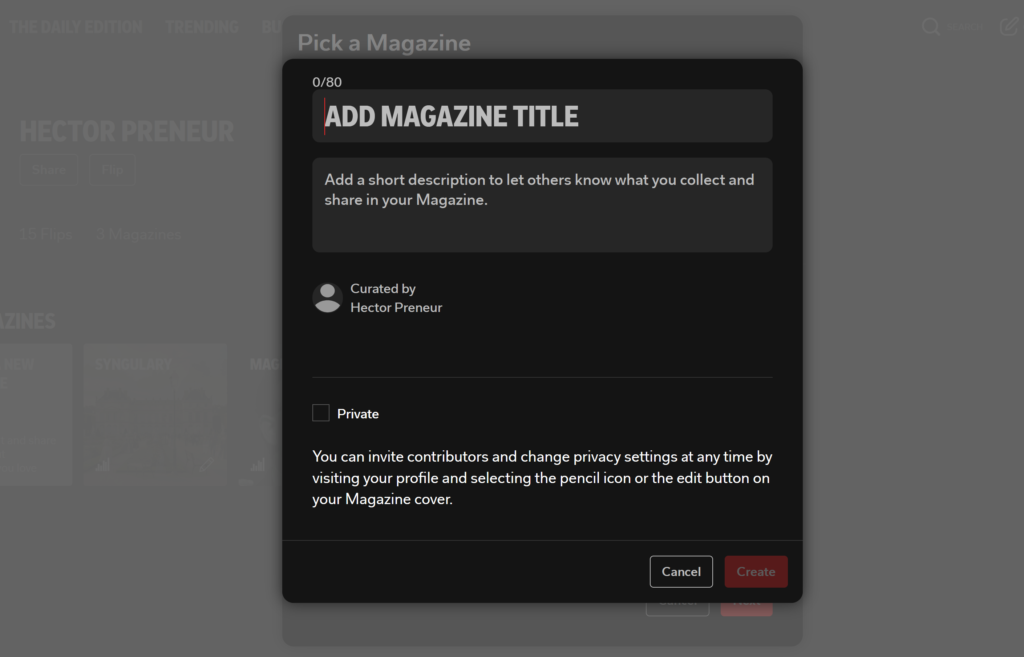
If your site covers several unrelated subjects, separate Magazines can keep those subjects apart. For a small site, there is no reason to create a pile of Magazines on day one. Start with the subject you have enough articles to support.
What Kind of Blog Posts Should You Add?
I’d start with posts that will still have a reason to be read after the day they are published.
• A tutorial on installing a floating shelf
• A guide to planning a weekend trip to a particular city
• A beginner’s guide to growing tomatoes in containers
• A comparison of two popular budgeting methods
• A recipe people can come back to later
• An explanation of how a particular piece of software works

These are the kinds of articles that can still be relevant when someone discovers them weeks or months after publication.
Current or news-based articles can be added too. Evergreen posts simply give you material that doesn’t become dated as quickly.
Will Flipboard Send Traffic to a New Blog?
It can.
But I wouldn’t build a new site’s traffic plan around the expectation that Flipboard is going to send a flood of visitors. If you’re asking how does Flipboard work for blog traffic on a brand-new site specifically, the honest answer is: slowly, and only as one piece of a larger plan.
A brand-new website has very little history anywhere. Search engines need time to discover and evaluate its content, and other traffic sources have the same basic problem: nobody knows the site yet.
Flipboard gives you another place to put your content while that process is happening.
If somebody sees one of your stories, likes the headline and clicks, you get a visitor. Flipboard’s publisher information says publishers can see referral traffic when their content is on Flipboard and that clicks on articles lead back to their websites.
A handful of flipped articles is not a promise of a traffic spike. It is simply another route a reader can take to your site.
What About the SEO Value of a Flipboard Link?
This part needs a little caution.
A Flipboard story does create a link back to the original article, which gives your site another place where the article is represented online.
But I wouldn’t tell you that every Flipboard link is going to pass meaningful ranking power to your site. Google treats different types of links differently, and simply having another website link to you doesn’t automatically make that link valuable for rankings.
So the link is better treated as a bonus than as the reason to use Flipboard.
You may get referral visitors, and someone who finds the story can reach your site. Whether the link itself contributes to rankings is a separate question.
Is Flipboard Worth Using for a New Blog?
If you already publish blog content, the appeal is that you don’t have to create something completely new for it.
You already wrote the article. You already have the URL. You can put that URL into a relevant Magazine and give the post another place to be discovered.
Flipboard doesn’t need to replace Google, Pinterest, email, or other traffic sources. It can simply be another place where your content exists.
If you’re building a new site, a few minutes spent adding an article to a relevant Magazine is a small task. The important part is keeping expectations realistic and watching your own referral traffic.
Once someone reaches your site, what happens next matters too. Good internal linking can give that visitor somewhere relevant to go instead of making the first article the end of the visit. That’s covered in our guide to internal linking for small blogs.
And if you’re still working on getting those first visitors, how to get your first 1,000 visitors to a new blog covers the broader traffic problem. Flipboard is one small piece of that.
The Bottom Line
So, how does Flipboard work for blog traffic? It gives an existing blog post another place to be discovered, then sends a reader to the original article when that reader clicks.
For a new site, that can be enough reason to use it without expecting miracles. Put your better articles there, keep the Magazines relevant, watch what happens in your analytics, and let the traffic — if it comes — tell you whether the small amount of extra work is paying off.
Do I need a large Flipboard following to get traffic from it?
No large following is required to add your own articles to a public Magazine. The bigger question is whether people discover and click those articles.
Can I put my own blog posts on Flipboard?
Yes. Flipboard’s creator guidance describes using Magazines to share your own content. You can add your posts, and the resulting story links readers back to your website.
Is Flipboard a good SEO strategy?
I’d treat it as a small supporting activity, not an SEO strategy by itself. A Flipboard story can link back to your website, but there is no reason to expect those links alone to improve Google rankings.